

Agent Health
Agent Health is an evaluation and observability framework for AI agents. It helps you measure agent performance through “Golden Path” trajectory comparison — where an LLM judge evaluates agent actions against expected outcomes. Check out the GitHub repository for source code and contributions.
Quick start
Section titled “Quick start”# Start Agent Health with demo data (no configuration needed)npx @opensearch-project/agent-health@latestOpens http://localhost:4001 with pre-loaded sample data for exploration.
Who uses Agent Health
Section titled “Who uses Agent Health”- AI teams building autonomous agents (RCA, customer support, data analysis)
- QA engineers testing agent behavior across scenarios
- Platform teams monitoring agent performance in production
Key capabilities
Section titled “Key capabilities”- Real-time agent execution streaming and visualization
- LLM-based evaluation with pass/fail scoring
- Batch experiments comparing agents and models
- OpenTelemetry trace integration for performance analysis
- Pluggable connectors for different agent types (REST, SSE, CLI)
Architecture
Section titled “Architecture”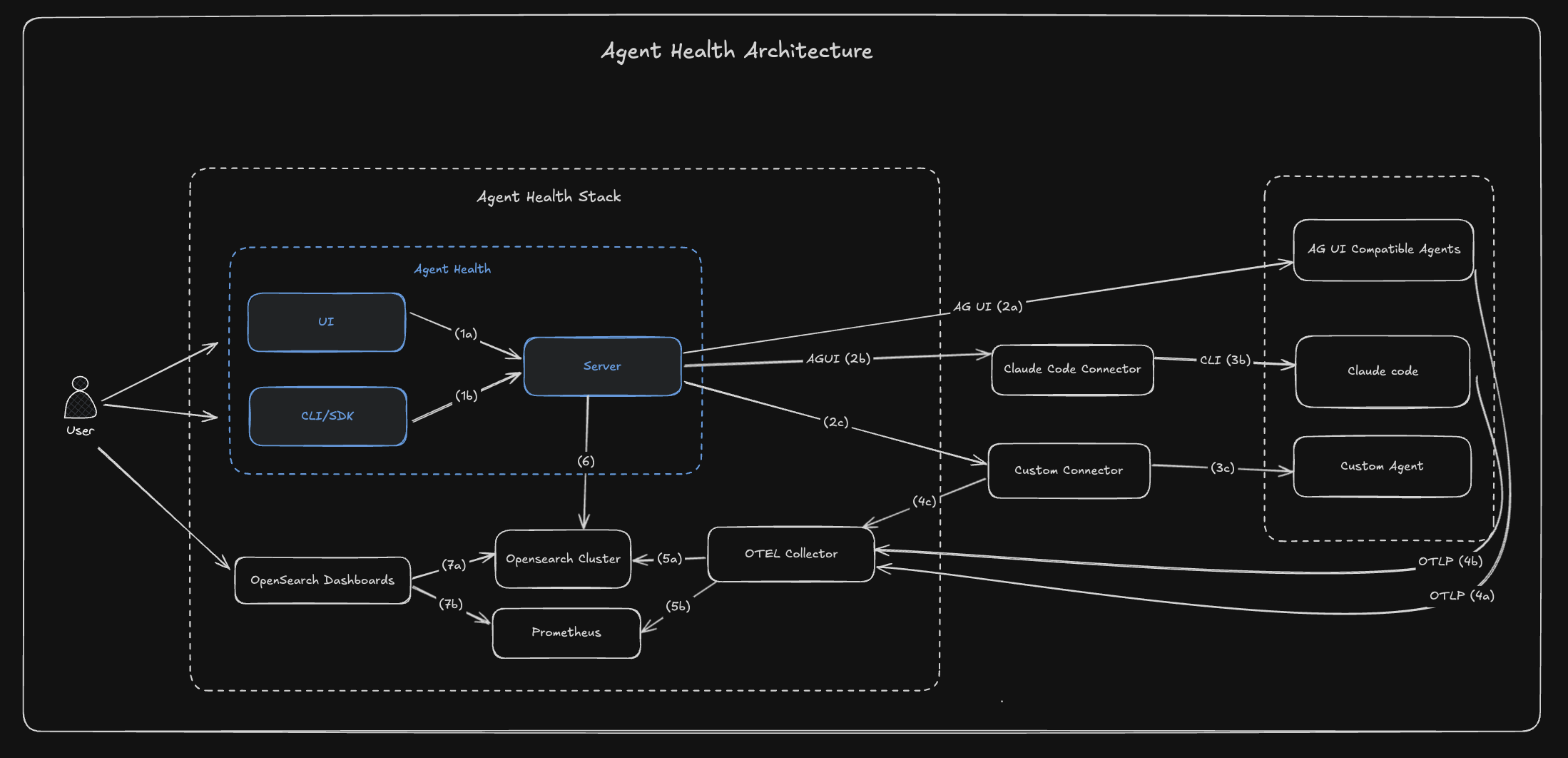
Agent Health uses a client-server architecture where all clients (UI, CLI) access storage through a unified HTTP API. The server handles agent communication via pluggable connectors and proxies LLM judge calls to AWS Bedrock.
Supported connectors
Section titled “Supported connectors”| Connector | Protocol | Description |
|---|---|---|
agui-streaming | AG-UI SSE | ML-Commons agents (default) |
rest | HTTP POST | Non-streaming REST APIs |
subprocess | CLI | Command-line tools |
claude-code | Claude CLI | Claude Code agent comparison |
mock | In-memory | Demo and testing |
For creating custom connectors, see Connectors.
Next steps
Section titled “Next steps”- Getting Started — step-by-step walkthrough from install to first evaluation
- Evaluations — how evaluations, test cases, and experiments work
- Trace Visualization — real-time trace monitoring and comparison
- Configuration — connect your own agent and configure the environment
- CLI Reference — all CLI commands and options