

SLOs
Service Level Objectives (SLOs) turn a reliability target — “99.9% of GenAI invocations succeed over 28 days” — into deployed Prometheus recording rules, multi-window burn-rate alerts, and a live error-budget view. The SLO app builds all of that from a guided wizard; you never hand-write PromQL unless you want to.
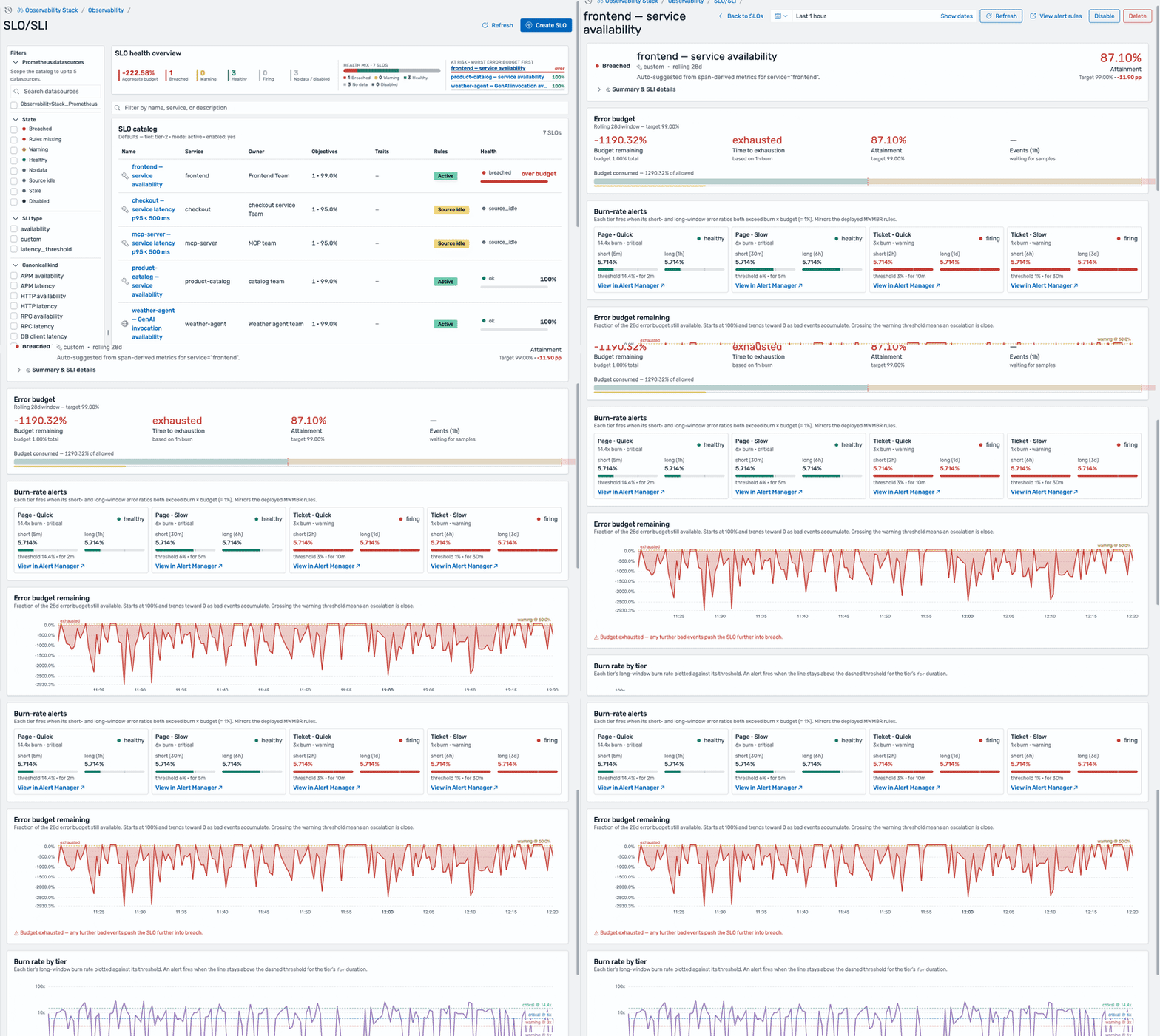
The SLO catalog and health overview, then into a breached SLO — attainment below target, budget exhausted, and the multi-window burn-rate tiers.
Concepts
Section titled “Concepts”| Term | Meaning |
|---|---|
| SLI (Service Level Indicator) | The measured ratio of good events to total events — for example, non-error requests ÷ all requests. |
| SLO (Service Level Objective) | The target the SLI must meet over a window, e.g. 99.9% over 28d. |
| Error budget | The allowed shortfall: 100% − target. A 99.9% SLO permits 0.1% bad events. |
| Burn rate | How fast the budget is being consumed relative to sustainable. 1x exhausts the budget exactly at the window’s end; 14.4x exhausts a 28-day budget in ~2 days. |
| MWMBR | Multi-Window Multi-Burn-Rate alerting — the Google SRE pattern of pairing a short and a long window per tier to catch fast burns quickly and slow burns reliably without flapping. |
How it works
Section titled “How it works”Each SLO you create is compiled into a Prometheus rule group deployed to the Prometheus rule engine:
- Recording rules — pre-compute the SLI error ratio at multiple time windows (5m through 3d).
- Burn-rate alerts — four severity tiers that fire only when both a short and a long window exceed the tier’s burn threshold (the MWMBR pattern).
- Error-budget warnings — fire at configurable budget thresholds (e.g. 50% and 20% remaining).
The SLO app reads those same rules back to power the error-budget, burn-rate, and request-volume charts, and the burn-rate alerts flow into the Unified Alerts View alongside your other alerts.
Finding your way around
Section titled “Finding your way around”SLOs is in the side navigation under Application Performance.
- SLO catalog (landing page) — every SLO with owner, objectives, rule status, and health, plus a health-overview strip and a deep filter rail (state, SLI type, canonical kind, service, team, tier, mode, enabled).
- Create an SLO — the template-first wizard.
- Explore an SLO — the detail page: attainment, error budget, burn-rate tiers, and the generated rules.
Related
Section titled “Related”- Create an SLO
- Explore an SLO
- Unified Alerts View — where SLO burn-rate alerts surface.
- Alerting — the Prometheus rules and routing that back SLO alerts.